Caching
- “cache” - temporary data storage to serve data faster by keeping data in memory
- it only stores the most frequently accessed data
- caches use the principle of “locality of reference” i.e. the tendency to access the same memory repetitively over a short period of time
- locality of reference can be “temporal” - accessing the same memory repetitively or “spatial” - if some memory is accessed, then its nearby memory can also be accessed in the near future
- whenever the request reaches the server, it either responds with the data from cache called a “cache hit”, or in case of a “cache miss”, it queries it from the database and populates the cache
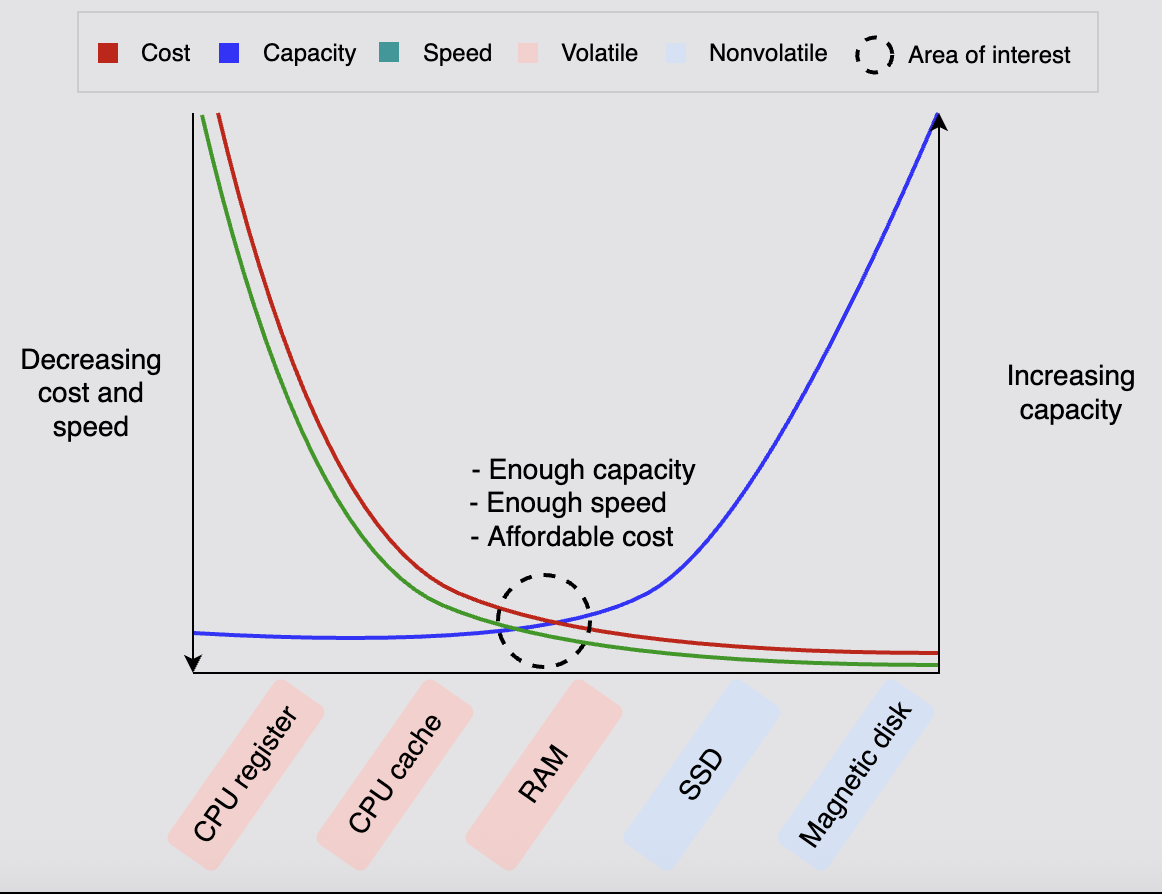
- below graph helps understand the different kinds of storage, and why ram is the optimal choice for cache
![]()
- “distributed cache” - when a single cache server is not enough to store all the data
- a single cache can also become a spof (single point of failure)
- advantages of using cache -
- pre generate and store expensive queries from the database
- store user session data temporarily
- “fault tolerance” - serve data from temporary storage even if database is down temporarily
- reduction in cost as well - network costs, database and its scaling costs, etc
- caching is also performed at various layers - cdn, dns, application cache (closest to the one we discuss here), cpu cache, etc
- now we discuss the 2 “reading policies” and 3 “writing policies”
- note - all strategies below can be explained nicely if using sequence diagrams
Cache Aside Strategy
- if cache hit, return
- if cache miss -
- application to cache - miss
- application to db to fetch data
- application to cache to populate cache
- application returns response to client
- the application continues to work even if the cache goes down - it falls back to database
- our current strategy does not interact with the cache for db writes, only reads. this has the following problems -
- for new data, there will always be a cache miss first
- inconsistency - we do not invalidate cache if the underlying data gets updated
- note - here, our application server has the logic for interaction with cache - so, we can also modify the data being stored in cache based on our needs to optimize it
Read Through Strategy
- same as cache aside strategy
- however, now the cache interacts with the database, and we do not get a chance to modify the data being stored in the cache i.e. the data inside cache would be the same as the data inside database
- how cache miss works - application will never know if it was actually a cache miss or a hit -
- application to cache - miss
- cache to db to fetch data
- cache populates itself
- cache returns response to application
- application returns response to client
Write Around Strategy
- when writing data to the database - invalidate the cache for the key
- the application removes the key from cache / marks the dirty flag as true for this document
- it is used alongside read through strategy or cache aside strategy
- it basically solves the inconsistency problem we had there
Write Through Strategy
- first write into the cache, and then write the same thing into the database
- “2 phase commit” - we need to ensure that both the operations are performed inside a single transaction - either both pass or both fail
- this too is used alongside read through strategy or cache aside strategy
- advantage over write around strategy - fetches for new data would not result in a cache miss - write around only solved the inconsistency problem, not this problem
- drawback - our system is now less fault tolerant - if either db or cache goes down, our application will go down
Write Back (or Behind) Strategy
- unlike write through strategy where we synchronously write into the database for a successful write, we asynchronously put the write into a queue after updating the cache in this case
- the data gets written into the database from the queue into the database eventually
- advantage - if our system is write heavy, it helps buffer writes into the database
- it also adds a lot of fault tolerance to our system - we no longer depend on the availability of database
- one failure scenario and its solution -
- a write operation is performed - write is performed on the cache and is put onto the queue
- the db is down for 5 hrs / the db is already performing writes which will take another 5 hrs to complete - so the message just sits in the queue
- the cache ttl is 3 hrs - so after 3 hrs, it tries to fetch the data from the database again
- now, since the write has not been processed by the database yet, it will not return this record to the cache, and our system will think that the data does not exist in the first place
- solution - make the ttl of cache higher
Consistency
- note - acid consistency != cap consistency
- various definitions -
- each replica should have the same data
- each read should give the value of the latest write
- so, we use “consistency models” instead
- “eventual consistency” -
- the weakest consistency model
- the replicas converge after a finite time, when no new writes are coming in
- however, it is always available
- e.g. - dns system, cassandra
- “causal consistency” -
- “dependent operations” are “causally related”
- ordering of causally related operations is guaranteed
- ordering of non causal operations is not guaranteed
- e.g. y = x + 5, so writing of y depends on reading of x
- this prevents non intuitive behavior of eventual consistency
- e.g. display replies to a comment after the comment itself
- “sequentially consistency” -
- preserves ordering by each client
- however, it might not be in the same order as some global clock
- e.g. in social web apps, we don’t care about the order our friends’ posts appear in. however, a single friend’s posts should appear in the same order they were created in
- “strict consistency / linearizability” -
- strongest consistency model
- a read operation from any replica will always return the most recent write operation
- very difficult to implement in distributed systems
- “synchronous replication” - consensus algorithms like paxos / raft are used to achieve this
- strict consistency affects availability. so, “quorum based replication” is used to increase this availability
- e.g. password change of bank account, when it is compromised
- e.g. google spanner, and also hbase i think guarantee strict consistency for a lot of operations
- we need to choose between performance / latency / availability and consistency
Failure Modes
- ordered based on how easy / difficult they are to deal with
- “fail stop” - the node halts. however, other nodes in the system can detect it by communicating with it
- “crash” - the node halts silently. and other nodes in the system cannot detect it
- “omission failures” -
- “receive omission failure” - the node fails to receive requests
- “send omission failure” - the node fails to respond to requests
- “temporal failures” - the node is very slow in generating results
- “byzantine failure” - the node exhibits random behavior, by transmitting arbitrary messages at arbitrary times
Transaction
- database transactions should be “acid” compliant
- “atomicity” - either all operations are completed successfully or they are all rolled back
- “consistency” - database should go from one consistent state to another. e.g. -
- some operation should not lead to a state where for e.g. the payer’s balance has reduced but receiver’s balance has not increased
- operations should not violate “integrity constraints”. recall - key, domain, entity, referential
- “isolated” - concurrent transactions do not interfere with each other - one transaction will not see the “intermediate state” of another transaction
- “durable” - results are persisted to disk so that they can withstand system failure
- “commit” - make operations of the transaction complete
- “rollback” - revert all changes caused due to a transaction
- “save point” - allows us to rollback parts of transactions
- when executing a transaction, “database locks” are used to lock either tables or rows depending on the database implementation
- so, transactions should be small, since they consume a lot of locks
- when something is locked, other operations will wait on this lock for it to be released
Distributed Transactions
- concepts of transaction discussed here work when transactions are local to a particular database
- for distributed systems, we can use -
- 2 phase commit - popular
- 3 phase commit - not much used due to complexity
- saga pattern - popular
- both 2 phase and 3 phase commit are said to be “synchronous”, while saga pattern is “asynchronous” - because the locks are not held in saga pattern
- typically, saga pattern is used for long transactions, when it is not feasible to keep the locks for such long periods and block all other operations
2 Phase Commit
- there are two phases -
- voting / prepare phase
- decision / commit / abort phase
- we have a “transaction coordinator”
- all the microservices participating in this flow are called “participants”
- e.g. think quick commerce. the order service needs to ensure that the inventory service has stock present, and that the delivery service can assign a delivery partner, in order to place an order successfully
- this is a case of “distributed transaction”, where we want to ensure atomicity across multiple services
- “voting / prepare” phase - all the services are notified about the update to perform. at this point, the services obtain “relevant locks” for this update and respond with an ok
- this locking is important so that for e.g. a simultaneous order does not end up occupying the same stock from the inventory service
- we can have “timeouts” for these locks to avoid locking them for infinite periods in case of issues
- if for any reason this operation cannot be performed - e.g. “order service” is the transaction coordinator, but the participant “inventory service” responds that there is not enough stock - then it responds with a not ok
- “decision / commit / abort” phase - based on the response from participants from earlier phase, the transaction coordinator asks all participants to commit / abort the transaction
- so, the actual operation is performed by inventory service / delivery service only if the order service (transaction coordinator) responds with an ok in the second phase
- still, if there is some failure in these steps, try to think of saga pattern etc i.e. perform a compensating operation
- note - before performing any operation - both actors - transaction coordinator and participants write the operation to their local file - i think this is like “write ahead log”. before performing any request / any acknowledgements, this file is updated first. this way, if they go down, they can read from this file when they come back up
- disadvantage of 2 phase commit - coordinator service is the single point of failure
- if for some reason the transaction coordinator goes down after the participants have obtained locks, the other transactions performed on the participants would be stalled because of this lock. the lock would be held till the transaction coordinator comes back up and asks them to either commit or abort the transaction

3 Phase Commit
- same as 2 phase commit, except that the commit phase is broken into two parts -
- pre commit phase
- commit phase
- during the pre commit phase - the transaction coordinator only sends the decision of commit or abort - this operation is not performed
- the actual commit / abort is only performed the next phase - the commit phase
- now in this pattern, unlike in 2 phase, there is intercommunication between the participants
- so, it is almost like we have a “secondary coordinator” taking over. this secondary coordinator is nothing but one of the participants themselves
- this way, if there is a failure at either the pre commit or the commit phase, the participants can make decisions
- e.g. if any of the participants had received the commit message from the coordinator, it means that the rest of the participants can also kick off the commit phase
- however, if none of the participants had even received the pre commit message, they can all safely decide to abort the transaction
Database Indexing
- data pages -
- internally, data is not stored as tables - that is just a representation
- it creates data pages - generally 8kb i.e. 8192 bytes in size
- it has three parts -
- header - 96 bytes - metadata like page number, free space, checksum, etc
- data records - 8192-(96+36) = 8060 bytes - holds the actual data records
- offset - 36 bytes - using an array, each index stores a pointer to the corresponding data record in the data records section described above
- e.g. if a row is 64 bytes, one data page can store 8060/64 = 125 table rows
- so for storing one table, the underlying dbms will manage multiple data pages
- data blocks -
- data pages ultimately get written to data blocks
- a data block is a section in the actual underlying physical memory that can be read from / written to in one i/o operation
- the dbms does not have control over the actual data block, only data page
- a data block can hold one or more data pages
- so, the dbms maintains a mapping of what data page is stored inside what data block
- indexing - it is used to increase the performance of database queries. without it, the db would -
- load all the data blocks one by one
- go through all the data pages in this block one by one
- go through all the data records this page one by one
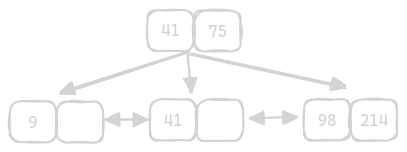
- b+ trees -
- dbs instead use b+ tree to help achieve logN time, instead of the n described above for crud operations
- b trees vs b+ trees - in b+ trees, the leaf nodes also maintain links to each other, unlike in b trees
- m order tree or m ary tree means means a node can have m - 1 keys and m pointers
- this tree maintains the sorted property
- the tree is always height balanced
- the actual values are always in leaf nodes
- the values in all other intermediary nodes just help with traversing the tree / reaching the leaf nodes quickly
- right is greater than or equal to, left is strictly lesser than
- notice how the leaf node level is like a sorted array
- the key is the value of the node, which helps us with efficient traversal
- an additional pointer is stored in every leaf node as well, which points to the actual data page
- now, using the data page to data block mapping, we can fetch the right data block
- types of indexing present in rdbms - clustered indexing and non clustered indexing
- clustered indexing -
- what order the original b+ tree is constructed in is determined by the column we use for clustered indexing
- this is why only one clustered index is allowed - because it affects how the original b+ tree is constructed
- the records in the “data records” section of data page may be jumbled - they are ordered according to insertion time
- however, we want them to be ordered based on our indexed column
- so, we use the offset field - recall that offset is an array
- assume our id insertion order is 1 4 5 2
- the offset would look like this - (pointer to 1, pointer to 2, pointer to 4, pointer to 5) = (0, 3, 1, 2)
- if we do not specify anything - the primary key is used for clustered index
- non clustered indexing -
- we have many other keys - secondary index, composite index, etc - they all use non clustered indexing under the hood
- we can have multiple non clustered indices unlike clustered index
- each non clustered index will use a new b+ tree
- so, while clustered indexing determines how the original b+ tree is constructed, non clustered indexing determines how this additional b+ tree is constructed
- the leaf nodes of this new b+ tree contains pointers to the actual data pages
Concurrency Control
- “critical section” - accessing a shared resource
- e.g. multiple users try to book the same seat, which is seen as free by all of them - and they all try to confirm it
- techniques like using
synchronizedwork only for contention among multiple threads of the same process - so, we need to use “distributed concurrency control” for different processes on potentially different machines
- we have two types of distributed concurrency control - “optimistic concurrency control” and “pessimistic concurrency control”
- “shared locks” -
- shared locks are used for reads
- assume one transaction puts a shared lock on some row
- another transaction can also come in and put a shared lock on this row
- however, another transaction cannot come in and put an exclusive lock on this row - it would have to wait till all the shared locks are removed from this row
- “exclusive locks” -
- exclusive locks are used for writes
- assume one transaction puts a exclusive lock on some row
- another transaction cannot come in - neither with shared nor exclusive lock
- “dirty read problem” -
- both transaction a and transaction b start
- transaction a updates the value of a row to 5
- transaction b reads this value as 5
- however, due to some error, transaction a has to rollback its changes back to original value
- so, transaction b reads intermediate, uncommitted data of transaction a
- “non repeatable read” -
- transaction a reads the value of balance as 100
- transaction b comes in, updates the value to 110 and commits
- when transaction a tries reading the value of the row again, it reads it as 110
- so, transaction a read different values for the same row during different parts of its transaction
- “phantom read” -
- transaction a sees 500 rows in the database
- transaction b comes in and commits 5 new rows
- transaction a now sees 505 rows in the database
- so, transaction a basically saw different number of rows in the database during different points in the transaction
- isolation level - recall isolation of acid
| isolation level | dirty read possible | non repeatable read possible | phantom read possible |
|---|---|---|---|
| read uncommitted | yes | yes | yes |
| read committed | no | yes | yes |
| repeatable read | no | no | yes |
| serializable | no | no | no |
- “read uncommitted” -
- no locks are used
- only use when system only involves reads
- “read committed” -
- shared lock is acquired for read but released as soon as read is over
- this explains why we can see committed values by other transactions when we try reading twice
- exclusive lock is acquired for write and kept till the end of the transaction
- “repeatable read” -
- shared lock is acquired for read and kept till the end of the transaction
- exclusive lock is acquired for write and kept till the end of the transaction
- “serializable” -
- works just like repeatable read
- additionally, it puts a “range lock” on the rows that it touches
- typically, we can set the transaction isolation level like so -
set transaction isolation level repeatable read; begin_transaction; ... commit transaction; end_transaction; - “optimistic concurrency control” -
- uses isolation level of read committed
- solves concurrency problem using “versions”
- in case of the non repeatable read, transaction a would know that the version has changed (refer example of non repeatable read above)
- advantage - allows much higher levels of concurrency as compared to pessimistic concurrency control
- disadvantage - if we have too many concurrent writes, we would fail at the last step for all of them, thus wasting too many resources
- “pessimistic concurrency control” -
- uses isolation level of repeatable read / serializable
- can have much more deadlock scenarios -
- transaction a and transaction b start off in parallel
- transaction a acquires shared lock on row a
- transaction b acquires shared lock on row b
- transaction a tries to acquire exclusive lock on row b - cannot because of transaction b
- transaction b tries to acquire exclusive lock on row a - cannot because of transaction a
- understand how the exact same scenario discussed above would not have resulted in a deadlock scenario in case of optimistic concurrency control, because it does not hold the shared lock
- database systems are able to detect deadlocks like this and then fail the transactions
2 Phase Locking
- 2 phase locking is a type of pessimistic concurrency control
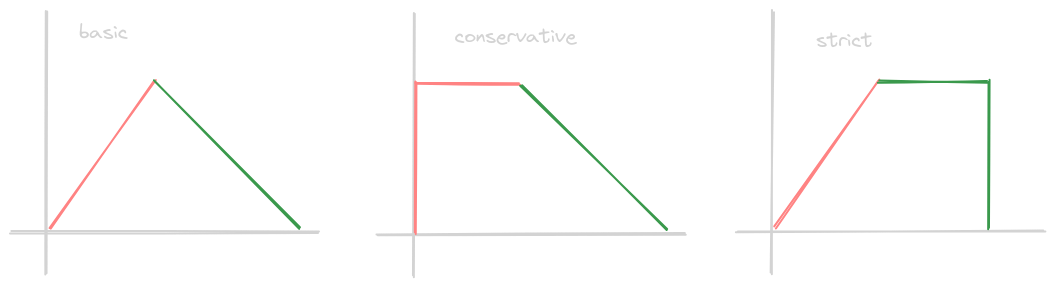
- there are 3 types of 2 phase locking - “basic”, “conservative” and “strict”
- “basic 2 phase locking” -
- phase 1 - “growing phase” - transaction can only acquire new locks. the lock manager can either grant or reject this request
- phase 2 - “shrinking phase” - transaction cannot acquire any new locks, only release locks
- basic 2 phase locking has two issues - deadlocks and cascading aborts
- “deadlock” example - the exact one we discussed in pessimistic concurrency control is a good example
- “cascading aborts” example -
- recall how releasing of locks is done one by one in the shrinking phase of basic 2 phase locking
- so, lets say transaction a releases exclusive lock on a row as part of the shrinking phase
- now, lets say transaction b acquires a shared lock on this row as a part of its growing phase
- now, what if transaction a had to be aborted suddenly due to some error
- now, transaction b has an inconsistent value of the row, and it would have to be aborted as well
- deadlocks can be solved by conservative 2 phase locking and wait for graph
- cascading aborts can be solved by strict 2 phase locking
- cascading aborts are considered very expensive, since they can result in a “chain of cascades”
- note - we want to maintain some degree of concurrency as well, not just consistency, like discussed during optimistic and pessimistic concurrency control
- so, we typically use strict 2 phase locking to resolve cascading aborts and wait for graph for resolving deadlocks
- “wait for graph” -
- the scheduler maintains a graph, where the nodes represent the transactions
- e.g. if transaction a is waiting on a lock to be released which has been acquired by transaction b, then there is an edge from transaction a to transaction b
- once there is a cycle that is detected by the scheduler in the graph, it looks for the “victim” in this graph, and then aborts that transaction
- in choosing the victim, it might make considerations like the amount of effort already put in by this transaction, amount of effort to rollback this transaction, how many cycles would be removed by aborting this transaction, etc
- “conservative 2 phase locking” -
- requires transactions to acquire all locks at the beginning itself
- either the scheduler assigns all the locks to the transaction if possible
- or the transaction will have to wait if one or more of the locks are unavailable
- disadvantages - allows very less concurrency, does not prevent cascading aborts
- “strict 2 phase locking” -
- all the locks are released at once when the transaction is aborted / committed
- disadvantages - allows very less concurrency, does not prevent deadlocks
Brewer’s CAP Theorem
- in case of a network partition, a distributed database has to chose one of consistency and availability
- e.g. below, a user updates the value to 6 in a replica
- another user queries another replica. the replica then via intercommunication realized that the value has changed, and sends the updated 6 value to the user
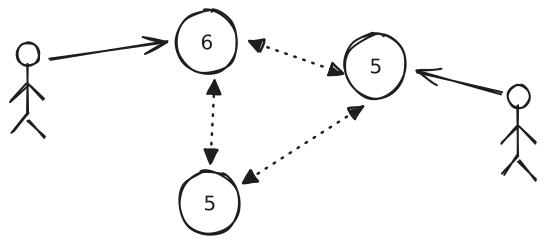
- “network partition” - e.g. due to some network issues, one replica is isolated from others
- now, the replica that is isolated has two options -
- favoring availability - return its local value, which may be outdated
- favoring consistency - return an error, asking to try again later
- note - this only happened when there is a network partition, otherwise, all three were guaranteed
- definitions below in cap theorem are a little bit different then what we saw for e.g. here
- “consistency” - read request receives either the most recent write or an error. this helps guarantee all the clients see the same value at the same time, regardless of the database instance they communicate with
- “availability” - every request receives a non error response, which can be outdated
- “partition tolerance” - system continues to operate despite an arbitrary amount of messages being lost over the network
- so, cap theorem states that we can only have two of the three things
- so, we already saw cp and ap, what about ca?
- we can have ca if we have no replicas - only a centralized database
PACELC Theorem
- cap theorem does not answer “what if there is no network partition”
- in this case, we can choose between “latency” and “consistency”
- pac is the same as cap, while elc is for else choose between latency consistency
- pc / ec systems - hbase, google spanner, etc, which favor consistency over availability / lower latency
- pa / el - google big table, dynamodb, cassandra
- pa / ec - mongodb, and even big table again. my understanding - the idea is we can configure the consistency levels when performing operations, so that we choose consistency over low latency, by for e.g. reading from the leader
Improve Quality Attributes of Databases
- three techniques - indexing, replication, partitioning
- “indexing” - speed up retrievals by locating them in sub linear time
- without indexing, retrievals would require a full table scan
- this is a performance bottleneck
- underneath, it uses data structures like
- hash maps - e.g. find all people from a particular city. city can be the key, while the value can be a list of row indices containing that city
- balanced b trees - e.g. find all people in a particular age range
- composite indexes - formed using a set of columns
- while the advantage is that reads speed up, disadvantages are
- more storage space is required
- writes become slower
- “replication” - already discussed in fault tolerance for compute, same logic
- disadvantage - not trivial to maintain, more common in non relational databases than in relational databases
- “partitioning / sharding” - in replication, we copy the same data in all replicas. in partitioning / sharding, we split the data in different replicas
- now, we are not limited by the storage capability of one machine
- additionally with more storage, queries can now be performed in parallel on the different partitions, thus increasing the speed
- disadvantage
- route the query to the right partition
- avoid hot partitions, etc
- more common in non relational databases than in relational databases
- partitioning can be done for compute as well - e.g. traffic from paid customers go to more powerful machines unlike traffic from free customers
Data Storage
Relational Databases
- refer relational databases - tables, rows, columns, primary and foreign keys, etc
- advantages -
- perform flexible and complex queries using for e.g. joins
- remove data duplication by storing data efficiently
- intuitive for humans
- provides guarantees around acid transactions
- disadvantages -
- rigid structure enforced by schema, which requires planning ahead of time
- impedance mismatch
- hard to maintain and scale due to guarantees around acid transactions
- it can only be scaled vertically, not horizontally
- slower reads
Non Relational Databases
- nosql databases - non relational databases
- solve drawbacks of relational databases
- advantages -
- remove rigidity around schema - different records can have different sets of attributes
- eliminate the need for an orm - store data in a more “programming language friendly” and not “human friendly” way, by supporting structures like lists, maps, etc
- support much faster queries
- scale much more than relational databases, which is useful for big data like use cases - it can be scaled horizontally as well
- it follows base -
- basically available - never rejects the reads or writes
- soft state - can change data without user interaction - e.g. when performing reconciliation when there is deviation between replicas. this happens since it supports eventual consistency / prefers availability over consistency (refer cap theorem)
- eventually consistent - we might get stale data
- disadvantages -
- does not support complex querying - operations like joins become hard
- acid transactions are not supported
- we can also use nosql databases as a layer of cache in front of sql databases
Types of Non Relational Databases
- key value store -
- the value can be anything and it is opaque to the database
- we cannot typically query on the value, only on the key
- use cases - counters touched by multiple services, storing user session information, etc
- the “key” acts as the “primary key”, and is a combination of “partition key” and “sort key”
- e.g. redis, dynamodb
- document store -
- collections of “documents” (e.g. json, xml, bson, etc)
- documents have relatively more structure compared to a key value store
- unlike key value store, we can query on values
- e.g. cassandra, mongodb
- graph database -
- helps establish relationship between records easily
- nodes represent entities, while the edges are for relationships
- use case - recommendation engine, social networks, etc
- e.g. neo4j, neptune
- columnar databases -
- organize data by columns instead of rows
- makes it more efficient when we try to grab specific fields, aggregations on them, etc
- useful for read heavy systems
- e.g. snowflake, big query, redshift
- wide column databases -
- do not confuse with columnar databases
- store data in rows grouped into column families
- so, more suited for write heavy workloads unlike columnar databases
- e.g. hbase, cassandra
Unstructured Data
- unstructured data - does not follow any “structure”
- e.g. audio / video files etc - they are just a blob “binary large object”
- while both relational and non relational databases allow for storing of blobs, they are meant for structured, and not unstructured data. e.g. they impose size limits etc
- some use cases of unstructured data -
- users upload files like videos and images, which we need to process (e.g. transcode, compress, etc)
- relational / non relational database snapshots - these snapshots are unstructured data
- web hosting - static content
- huge datasets used for machine learning, e.g. readings from sensors
- two solutions for unstructured data - dfs and object storage
- dfs - “distributed file system”
- features / advantages -
- internally, can have features like replication, auto healing, etc
- looks like a familiar tree like structure (files within folders) to us
- works like file system - mounting on hosts etc
- we can modify files like we typically do when working locally, e.g. append logs to log files
- disadvantage
- cannot work with web for static content directly - will require a wrapper on top
- has limits on the number of files we can store i.e. the storage space has limits
- “object / blob storage” - scalable storage, but unlike dfs has no limits on how many objects can be stored
- stored in containers called buckets
- also, object storage allows “bigger” files compared to dfs - which makes them ideal for storing database snapshots
- they expose a rest / http api unlike dfs, which can be easily referenced by our static html pages
- they support “object versioning” - for a file system, another wrapper would be needed
- files are stored in a “flat structure” - not a tree like structure like in file systems
- the object has a name and a value associated with it, which is the actual content
- typically, object storage is broken into several classes, which offer different throughput and latency
- object storage uses replication too
- disadvantage -
- files cannot be opened and modified like we can when using dfs - we need to for e.g. create and upload an entirely new version
- cannot be mounted like file systems
- we can also run object storage services on our own storage, if cloud is not an option
- e.g. openio is such a solution
- s3 (simple storage service) is aws’s object storage
Big Data
- datasets are either very large in size or come at a very high rate for our system to be able to process
- the output of big data processing can be visualizations, data that can be queried, predictive analysis, etc
- “batch processing” -
- we store the data on distributed file system
- we then run jobs on it based on a schedule
- every time the job runs, it can either pick up the new data that was added to the system since the last time it ran, or it can process the entire dataset from scratch
- after processing, it can write the computed view to a database
- advantages of batch processing
- easy to implement
- more efficient than processing each event individually
- e.g. we push some faulty code. if our dfs still has all the original data, we can push the fixed code and run the job on the entire dataset again
- finally, we have visibility into historic data as well
- drawbacks - not realtime
- e.g. we would like logs and metrics to be analyzed realtime so that we can identify and debug production issues quicker
- so, we use “stream processing”
- the events come on a message broker
- so it reacts realtime, not based on a schedule
- after processing, it can write the computed view to a database
- advantage - react immediately
- disadvantage - complex analysis cannot be done - fusing data from different times is very difficult / not possible - our computations can only use recent data
- going back to the same e.g. of observability systems, we would need historic data as well in anomaly detection
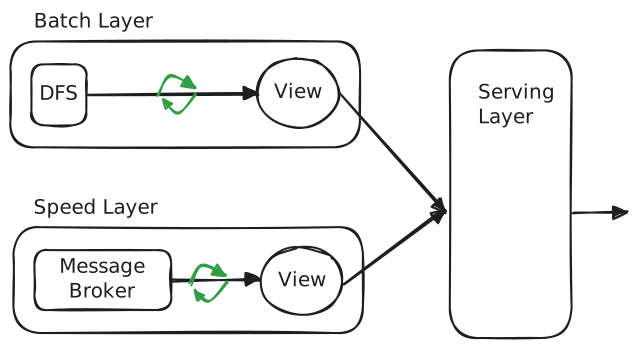
- so, we can use the “lambda architecture” - balance between batch processing, and stream processing
- it has three layers
- “batch layer” - follows the batch processing architecture. it takes all the data into account and typically overwrites its old output
- “speed layer” - follows the stream processing architecture. it helps fill the gap caused by events which came in since the last event that was operated on by the batch job
- “serving layer” - joins the outputs of the batch layer and speed layer and combines them into one
OAuth
- oauth2 - authentication and authorization standard
- e.g. there is a third party app called tweet analyzer that uses tweet data to show analytics to a front user
- option 1 - we give tweet analyzer our credentials. this option is insecure, since - we share our credentials with a third party app, thus we compromise our credentials. tweet analyzer can now do everything that we as an account owner can do, e.g. create tweets, i.e. there is no restricted access
- option 2 - twitter gives temporary access to tweet analyzer app
- oauth2 is a specification / protocol, which we need to implement
- it has various “grant types” - “authorization code” and “client credentials” are the two most important grant type flows for now
- “resource owner” - the end user i.e. us
- end users own “resources”, e.g. tweets in our case
- “client” - tweet analyzer in our case. it is the third party application trying to get restricted access to “resource”
- “authorization server” - “resource owners” should have an account inside this “authorization server”
- “resource server” - the application which maintains the “resources”, e.g. twitter in our case
- sometimes “resource server” and “authorization server” can be clubbed into one
- “scopes” - the granular permission that the “client” wants, that “authorization server” gives
- general flow -
- first, the tweet analyzer apps needs to register itself with twitter. this gives them the “client credentials” - the “client id” and the “client secret”
- the resource owners then tries logging in with twitter and not our application
- the resource owners are prompted to provide consent to the client to perform the actions specified via scopes on the resources
- if the resource owners consent to this, the client is provided with an “access token” and a “refresh token” to issue api calls to twitter on behalf of the client
- “authorization code” grant type flow -
- resource owner goes to client
- client redirects to authorization server with -
- client id - helps authorization server identify the client
- scope
- redirect uri - where the authentication server redirects post successful authentication
- response type - “code” - tells that we want authorization code
- state - helps with csrf like attacks
- resource owners enter their credentials here
- assume successful authentication here
- client receives an authorization code
- client goes to authorization server with -
- client id
- client secret - to prove itself
- redirect uri
- grant type - “authorization_code”
- the authorization code
- client gets an access token for the resource owner from the authorization server
- client can then use this access token to make requests to the resource server on behalf of resource owner
- this architecture of first getting an authorization code and then getting the access token helps with better security. the first step helps with verifying the resource owner and the second step with verifying the client
- “implicit” grant type flow (deprecated, removed from oauth 2.1) -
- client receives the access token directly i.e. the entire flow authorization code onwards is skipped
- so, the obvious drawback - the client itself is not verified. anyone can mimic the url where they redirect to authorization server. remember it does not have the client secret, only the client id. and in exchange, they can directly obtain the correct access code
- “password” grant type flow (deprecated, removed from oauth 2.1) -
- resource owner “directly gives” the credentials to the client
- so, the obvious drawback is compromise of credentials
- use case of client credentials grant type flow - no resource owner is involved, so useful for service to service communication. organization a (client) interacts with organization b (resource server and authorization server)
- “client credentials” grant type flow -
- client sends request to authorization server with -
- client id
- client secret
- grant type - “client_credentials”
- scope
- client gets back access token
- client uses this access token to request resource server
- client sends request to authorization server with -
- “refresh token” helps avoiding resource owners from initiating entire login flow again after access token expires
- client sends request to resource server with expired access token, hence gets a 401
- client sends request to authorization server with -
- client id
- client secret
- grant type - “refresh_token”
- refresh token
- client receives back a fresh access and refresh token
- the client can use this new access token now to make requests to the resource server
- refresh tokens expiry -
- refresh tokens do not typically have an expiration, but can have one
- also, refresh tokens can be “rolling” i.e. they are single use and should be replaced with the new refresh token received every time a request for a fresh access token is made
- how can a resource server verify the access token provided by the client? - three options -
- api interaction between authorization server and resource server. drawback - an additional api call from resource server to authorization server every time
- both authorization server and resource server can have access to the same shared storage. drawback - shared storage
- recommended - when the resource server boots up, it gets a public certificate from the authorization server. this public certificate is used to validate if the access token has been tampered. also called “jwk endpoint”
- oidc - openid connect - oauth helped with authorization. by adding openid on top of it, we can use it for authentication as well
- a specific scope called “openid” is added to the list of scopes to get the identity details of the resource owner
- this way, we additionally get an id token along with access and refresh tokens
- the id token is in the form of jwt
- unlike access token, id token contains things like user name, email, etc - this is what helps with authentication
- so, two things are being done by our resource server -
- it is verifying the access token using the certificate
- it is parsing the token to get user roles, and this is possible because the token is in jwt format - recall how payload and header are just base64 encoded
- we send the token using
Authorization: Bearer <<token>> - authorization code grant type flow by itself would only work when we use jsp, thymeleaf, etc i.e. server side templating languages
- however, we cannot hide the client secret in spa applications, since the entire source code is accessible from the browser
- so, we use pkce - proof key for code exchange
- so, the client generates
- “code verifier” - a random cryptic string
- “code challenge” - base64(sha256(code verifier))
- the ui first when asking for the authorization code in the “authorization code” grant type flow sends the code challenge
- bts, the authorization server stores this code challenge, and returns the authorization code
- the ui then sends a request for an access token. this request unlike in the regular “authorization code” grant type flow which includes the client secret, includes the code verifier
- the authorization server then compares this code verifier with the code challenge which it had stored
- if the values match, the authorization server returns the right tokens
- so my understanding - “authorization code” grant type flow is almost same as “pkce”, except
- the first request from the client includes the code challenge
- the second request from the client does not include the client secret, but includes the code verifier
- so, with a mitm kind of attack - if someone gets access to authorization code, it is not enough, they need the code verifier as well, and they cannot predict code verifier from the code challenge, since it is encrypted using sha256
- so, in oauth2.1, they have started clubbing authorization code + pkce grant types together
- my understanding - if someone gains access to our client id, why cant they self generate the code verifier and code challenge and ask for a new access token? they can, but the redirect uri might help us here by redirecting to our own website! (note - there is some component of specifying valid redirect uris when registering clients with the authorization server)
- now is there not a second issue above - redirecting to a legitimate app from an illegitimate app? - solved by the “state” parameter, which helped us with csrf attacks
Encryption
- converts our “plain text” data into a “cipher text”
- “symmetric encryption” -
- same “key” is used for encryption and decryption
- two popular algorithms - aes and des (des is no longer recommended, has been cracked)
- advantage - symmetric encryption consumes much less resources compared to asymmetric encryption
- disadvantages -
- secure distribution of key is difficult
- managing different keys for every clients - note that we cannot use the same key for different clients, otherwise they can intercept each other’s responses
- “asymmetric decryption” -
- use two keys - public and private
- “public key” - used by sender to encrypt
- “private key” - used by receiver to decrypt
- note - the above is not always true - my understanding of an example - in “digital signatures” in oauth, the resource server downloads public key from authorization server to validate tokens - aka public key is being used to decrypt?
- two popular algorithms - rsa, diffie hellman
- advantage - public key can be distributed easily to clients, while private keys are retained by servers
- disadvantage - very computationally expensive
- note - do not confuse with sha - it is hashing, not encryption - encoding != hashing != encryption
Security Threats
- websites play an important role in various aspects like commerce, banking, etc
- so, we need to protect them and the data they contain from security “threats” and “vulnerabilities”
Malware
- “malware” - malicious software
- below, we discuss different types of malware
- “viruses” - attaches itself to legitimate programs. once opened, it replicates itself to other programs
- “worms” - exploit vulnerabilities in a system to cause damage, by consuming network bandwidth etc
- “trojan horses” - disguised as a legitimate software to get access to sensitive information etc
- “ransomware” - encrypts the user’s files / locks them out of their system until they pay a ransom
- “adware” - advertisements or pop ups, often bundled with legitimate software. difficult to remove
Phishing Attack
- “phishing” - trick users into revealing sensitive information
- this might feel similar to for e.g. trojan horses
- but this is a “social engineering attack” unlike malware
- it means it uses psychological manipulation to deceive users
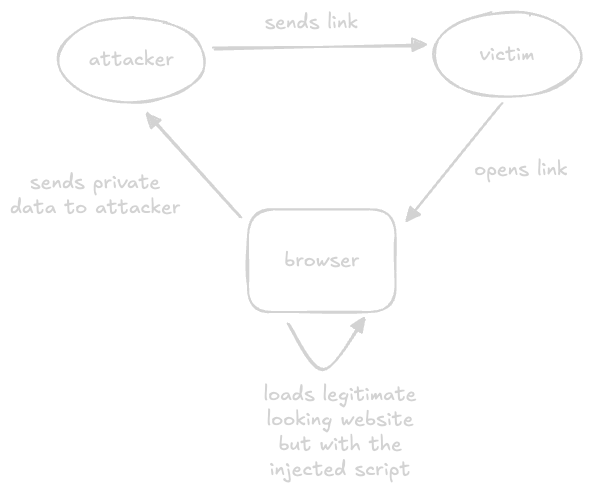
XSS Attack
- xss is “cross site scripting”
- attackers somehow inject malicious code into legitimate websites
- the injected code is executed by the users
- this then results in loss of sensitive information
SQL Injection Attack
- inject harmful sql into a web application to access underlying database
- e.g. user input in login forms to manipulate data, elevate privileges, etc
Denial of Service Attack
- overload the target system by bombarding it with a huge volume of traffic
- “distributed denial of service attack” is a common form of dos attacks, described below
- “botnets” - “compromised” devices that the attackers control
- attackers then orchestrate a massive attack using a network of these botnets
- the multiple sources of traffic make it difficult to defend against
Security Tests
- reveal vulnerabilities that can be exploited by security threats
- “vulnerability scanning” - automated tools that scan for known vulnerabilities in software
- “penetration testing” - simulating attacks to identify vulnerabilities
- “ethical hacking” - like penetration testing, but from an attacker’s perspective
- “security review”, “posture assessment”, “risk assessment” - more like a review process of the controls put in place, identifying potential gaps, etc