Introduction
- “internet” - network of computer networks
- “computer network” - group of interconnected computers
- internet history -
- as part of the cold war, the soviet union launched “sputnik” (the first space satellite)
- in response, the us created “arpa” (advanced research projects agency) to drive innovation
- 60s to 70s - arpa realized that computers could not talk to each other. so, “arpanet” was created
- while computers on the same network could communicate, computers on different networks could not communicate, since they used different protocols
- 80s - so, as part of “rfc 675”, “tcp/ip” came into existence as the standard
- hence, arpanet etc were migrated to tcp/ip
- academic and research institutions, government, etc adopted this, primarily for email
- www history -
- 90s - the “world wide web” (www) was created by tim berners lee at cern (european council for nuclear research) to easily share documents between computers
- these documents had “hyperlinks” to other documents, to make retrieving information easier
- browsers like “mosaic” and “netscape” were created to view these documents easily
- however, there was no way to search these documents
- so, “search engines” like yahoo and altavista came up, which created a “web index”
- “internet standard documents” -
- “rfc” (request for comments) - documents that describe the standards and protocols of the internet
- they can be submitted by anyone
- they are handled by the “internet engineering task force” (ietf)
- “protocols” - set of rules / standards for communication between systems. this for e.g. ensures interoperability between different hardware. below, we describe some protocols -
- “tcp” (transmission control protocol) - ensures reliable communication between systems
- “udp” (user datagram protocol) - faster than tcp, but does not guarantee the same reliability
- “http” (hypertext transfer protocol) - defines the “format of messages” to be exchanged between a “web client” and a “web server”
- computers talk in binary (0s and 1s). instead of sending all the bits at once, they are sent in small chunks called “packets”
- these packets are sent to the right destination using “ip address” and “port”. together, they are called an “endpoint”
- “ip address” -
- helps determine the right end system
- ip addresses are 32 bits
- represented as 4 octets in the “dotted decimal notation”
- find your ip address using
curl ifconfig.me -s
- “port” -
- helps determine the right application on that end system
- this is needed since there can be multiple applications running on an end system
- ports are 16 bit numbers (0-65535)
- “well known ports” - 0-1023 - reserved for specific applications, e.g. http at 80
- “registered ports” - 1024-49151 - by specific / proprietary applications, e.g. sql server at 1433
- 49152-65535 can be used for other purposes, e.g. “dynamic allocation”
Access Network
- “end system” or “edge system” - devices like computer, smartphone, etc. they are called so because they do not relay data from one device to another
- the collection of these end systems is called “network edge”. again, they do not contain routers etc
- “access networks” - also called “last mile”. connect end systems to the “edge router”, which is like a gateway to the internet
- “network interface adapter” - the physical hardware that connects the devices to end systems
- “transmission rate” - the rate at which data is transferred
- 1kbps = 10^3 bits per second, 1mbps = 10^6 bits per second, 1gbps = 10^9 bits per second
- “upload rate” - outgoing transmission rate from the end system
- “download rate” - incoming transmission rate to the end system
- some common access networks - dsl, cable, fth, wifi, etc
- “dsl” -
DNS
- the dns is an excellent example of a distributed system
- how it works - when we enter the human readable domain name, the browser sends a request to the “dns server”
- the dns server uses its database to resolve the domain name to an ip address and returns it
- finally, the ip address gets used by the browser to connect to the server
- “dns resolver” - the client side program that interacts with the “dns server”
- note - this resolver typically resides at our local / isp server. however nowadays, dns resolvers of google, cloudflare, etc might have better performance
- “dns load balancing” - also discussed here
- dns uses “caching” at various layers to reduce latency
- understand why - it is using eventual consistency because it handles many more reads than writes
- also, dns typically uses udp over tcp for faster results. but depending on use case, it can also use tcp. in case of large amounts of data, tcp is preferred. so, when performing “zone transfer” (copying over data from one dns server to another), tcp is used
- “root level name servers” - returns the ip addresses of the tld name servers that hold information about the “top level domain” (e.g. .io, .com, .io etc)
- note - there are 13 root level name servers in the world, but replicated to 1000 instances
- “tld name servers” - similarly, returns the ip addresses of the right authoritative name servers
- “authoritative name servers” - sometimes, these are the name servers of the organizations themselves. these return the ip addresses of the actual web servers
- chicken egg problem - if we need dns resolver’s ip address to tell us the ip address of any website, how do we find the dns resolver’s ip address first? - “dhcp” adds the dns resolver’s ip address in
/etc/resolv.conf. here, we can see the dns resolver’s ip address. also, the dns resolver has the ip address of the 13 root name servers configured, since they rarely change - useful commands -
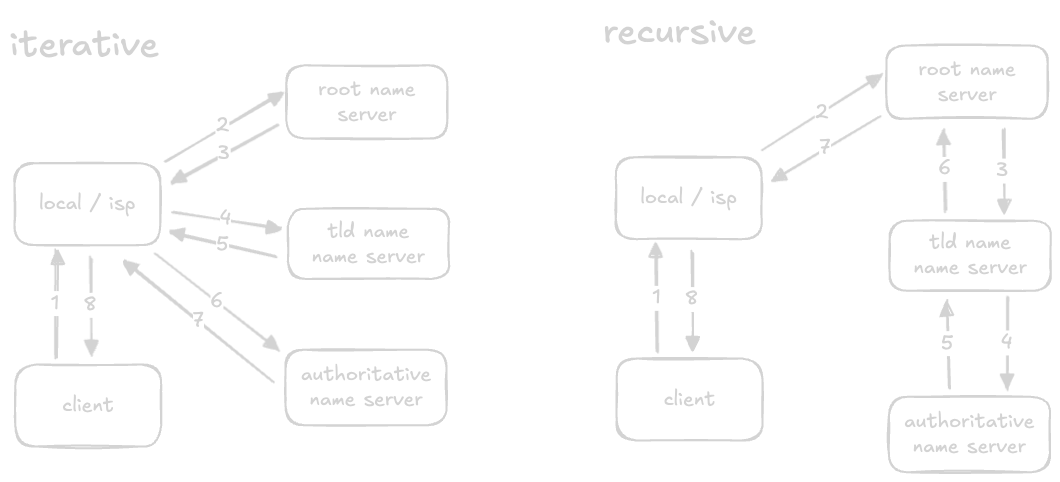
nslookup domain.comanddig domain.com - there are two ways the resolution can be performed - “iterative” and “recursive”. iterative is the one used to reduce the load on the actual dns infrastructure
DNS Records
- “a” - map domain name to ip address of the server hosting that website
- “aaaa” - also called quad a. same as a but for ipv6
- “c name” - stands for canonical name. allow multiple domains to be mapped to the same ip address. e.g. c name record of www.google.com can be mapped to the same ip address as that of google.com
- “mx” - stands for mail exchange. map domain names to mail servers of the website
- “ns” - stands for name server. map domain names to the dns servers for that domain
- “txt” - store arbitrary text data like ownership etc for a domain
- “ptr” - stands for pointer. used for reverse dns lookups, by mapping ip addresses to domain names
Network Protocols
- “application layer protocol” - two methods are there -
- “client server protocol” - e.g. http, ftp, smtp, websockets
- everything in client server protocol (including websockets) uses tcp
- http - follows a request response model. the client sends a request, while the server returns a response
- websockets -
- client and server have a bidirectional full duplex communication
- note - websockets are not the same as peer to peer - clients can talk to server, but clients cannot talk with each other
- it is an alternative to inefficient continuous polling using the request response model
- “peer to peer protocol” - e.g. web rtc (realtime communication)
- all can talk with each other - even clients can talk to each other
- this makes it fast, since messages need not be “relayed” via the server
- web rtc uses udp, which also makes it fast
- “client server protocol” - e.g. http, ftp, smtp, websockets
- “transport / network layer” -
- tcp -
- transport control protocol
- a single (virtual) connection is maintained
- on this connection, all packets are sent one by one
- maintains an ordering of packets
- receiver sends acknowledgements for every packet
- udp -
- user datagram protocol
- no connection as such is maintained
- packets can be sent in parallel
- no concept of ordering
- this makes it less reliable than tcp
- but, this also makes it faster than tcp
- use case - live streaming - if we miss some bits of a live video call, we will not rewind back to listen what we missed
- tcp -