Claude Code
Getting Started
- terminal first design, uses claude 4 sonnet
- specialized agents for code review, research, bug fixes, testing, etc
- integrates with github, jira, etc via mcp
- requires nodejs 18 or higher, check using
node --version - just type
claudeto launch it - it has an official extension for vscode - “Claude Code for VS Code”
- when we ask it - “what is the project about”, it does things like go through the readme, list the files using bash (
ls -la) and then generates a nice summary - “The project is a typical Jekyll-based blogging setup for documenting and sharing technical knowledge, with 36+ blog posts in the _posts directory” - if we just tell it the following - “add a function which returns hello $name”, it will automatically find the helpers file and add the function with the right signature. it asks us to approve the edit before applying it, and opens the diff in vscode ui for us to review
/exitto exit claude code, and resume the previous session usingclaude -c- for resuming an older conversation, use
/resumeand then select the conversation from the list. claude keeps them from 30 days - note - claude session histories are scoped to a folder, so open claude code in the same folder
- “automatic checkpoints” - helps us rollback to a previous state automatically. persisted for 30 days
- we can restore to a previous checkpoint using
/rewindcommand - note - this does not replace git commits, and we should still use git
- we can also ask claude to git commit for us! it can probably write better commit messages than us
- we can run bash commands directly from claude code - prefix commands with
!, e.g.! git status - we can tell claude to look in a specific folder using
@ - e.g. second command works much faster here, as it does not have to scan the entire project repository -
- what utils does this project have?
- what utils does this project have? under @dags/utils/ and @dags/nr_utils/
- similarly, we can tell it like so - add a custom logo to @src/components/Header.js
- claude has a nice auto complete for commands like
!and@we used above - “thinking mode” - default is “standard reasoning”, which is fast and good enough mostly. “thinking mode” is slower and uses more tokens. for it, one method i saw was prefixing my statements with
ultrathink, e.g.ultrathink add a function which returns hello $name - toggle to use haiku instead of sonnet for things like documentation, for costs improvement and more speed. we can switch using
/model - three permission modes in claude code -
- “plan mode” - readonly. create implementation plans, but does not make any changes
- “manual approve mode” - claude proposes changes, but we approve each of them. so, we have full control over the edits
- “auto accept mode” - changes are applied automatically. this helps with faster iteration
- we can toggle between them using shift + tab keys
- in plan mode for e.g., it will ask us clarifying questions like “which auth providers do you want to support” etc
Settings
- settings hierarchy in decreasing precedence -
- commandline arguments
- .claude/settings.local.json - local project settings specific to a user. so, add to gitignore
- .claude/settings.json - shared project settings. commit this to git for collaboration
- ~/.claude/settings.json - global user settings
Memory
- “context window” - amount of code claude can remember in a single conversation. everything - including all the code, the conversation history, etc must fit inside it
- “conversational loops” - all the previous input turns / claude’s output turns are part of the context window
- claude’s capacity - 200k input tokens (thousands of lines of code) and ~64k output tokens per “turn”
- when we document our project’s architecture, coding standards, etc, we are preloading claude’s context with this information for better responses
- claude has three levels of memory -
- “enterprise policy memory” - organization wide policies, where we define companies coding standards etc
- “project memory” - at ./CLAUDE.md or ./.claude/CLAUDE.md of the project. we should commit this to git and share it with other collaborators
- “user memory” - at ~/.claude/CLAUDE.md. it is a personal memory file
- hierarchy - enterprise policy memory > project memory > user memory
- we can use
/initcommand to generate CLAUDE.md automatically for us by analyzing the codebase - we can add to the memory i.e. the CLAUDE.md files by using
#, e.g.# always use descriptive variable names. it will prompt us for selecting the memory level to which we would want to add this information - some things worth adding to the CLAUDE.md file -
- architecture decisions
- things we keep repeating to claude
- frequently used commands
- coding standards
- instead of a monolithic CLAUDE.md, we can break the documentation into for e.g. the following files -
- docs/architecture.md
- docs/coding_standards.md
- docs/cli_commands.md
- we can then use the
@symbol for linking the documentation inside CLAUDE.md to make it stay clean, for e.g. our CLAUDE.md can look as follows -1 2 3 4 5 6 7 8
## Documentation Detailed documentation is organized by feature: - **@docs/architecture.md** - System design, services, data flow, and technology stack - **@docs/development.md** - Setup, commands, and development workflows for frontend / backend - **@docs/infrastructure.md** - Deployment, Kubernetes, Terraform, Helm, and secrets management - **@docs/testing.md** - Testing approaches, CI validation, and manual testing procedures
- after this linking, we can easily update any documentation using the
/memorycommand, and we can also try/initto see what updates CLAUDE makes to the different documentation files we have
Slash Commands
- we can add custom slash commands for claude code
- first, we create a file say ./.claude/commands/add-tests.md
- this means that the command would be available as
/add-tests - the content of the file would be something like this -
1
2
3
4
5
6
---
description: Generate comprehensive tests
allowed-tools: Read, Write, Edit
---

Add comprehensive tests for the specified functionality
![]()
- the front matter contains two parts - description and “allowed tools”
- allowed tools in this example gives access to reading / editing files
- we use these for commands we tend to repeat

Agents and Subagents
- we saw how claude is limited to 200k input tokens etc in memory
- however, this is for the “main agent” only
- for complex multi step tasks, we can create specialized “subagents” which have their own context window
- they report final results back to the main agent
- we can create a new agent using
/agents - just like most other things in claude code, it can be project or user specific
- we can specify which tools it can use, which model it should leverage, specify a color for it, etc
- sometimes, the main agent might not automatically invoke the sub agent. we can explicitly specify the name of the sub agent in our chat messages in such cases
- we can invoke the agent multiple times using a prompt like follows - “use multiple unit-test-writer agents in parallel to write tests for our code in @src/”
- to encourage proactive delegation, use
use proactivelyin the description1
description: Use proactively to debug spark related issues
- enable persistent memory - using this, the agent can get a persistent memory that can survive across conversations. again, different scopes like user, local, project etc. i personally felt that it is better to maybe add information as and when needed to the agent’s specification itself
- it has a “permission mode” to control how the agent handles permission prompts. e.g.
bypassPermissionsskips all permission checks. note to self - how about having read only agents with this mode for faster execution?
Skills
- skills and slash commands have now been merged
- it uses something called as “progressive disclosure”
- my understanding of progressive disclosure - claude only loads the front matter initially for a skill
- if deemed relevant for our current context, the remaining information for the skill is loaded
- it looks somewhat similar to the slash command -
1
2
3
4
5
6
7
8
---
name: how-to-loose-weight
description: a skill to help users with weight loss tips and advice
---

advice 1 - do not eat oil

advice 2 - do not eat sugar
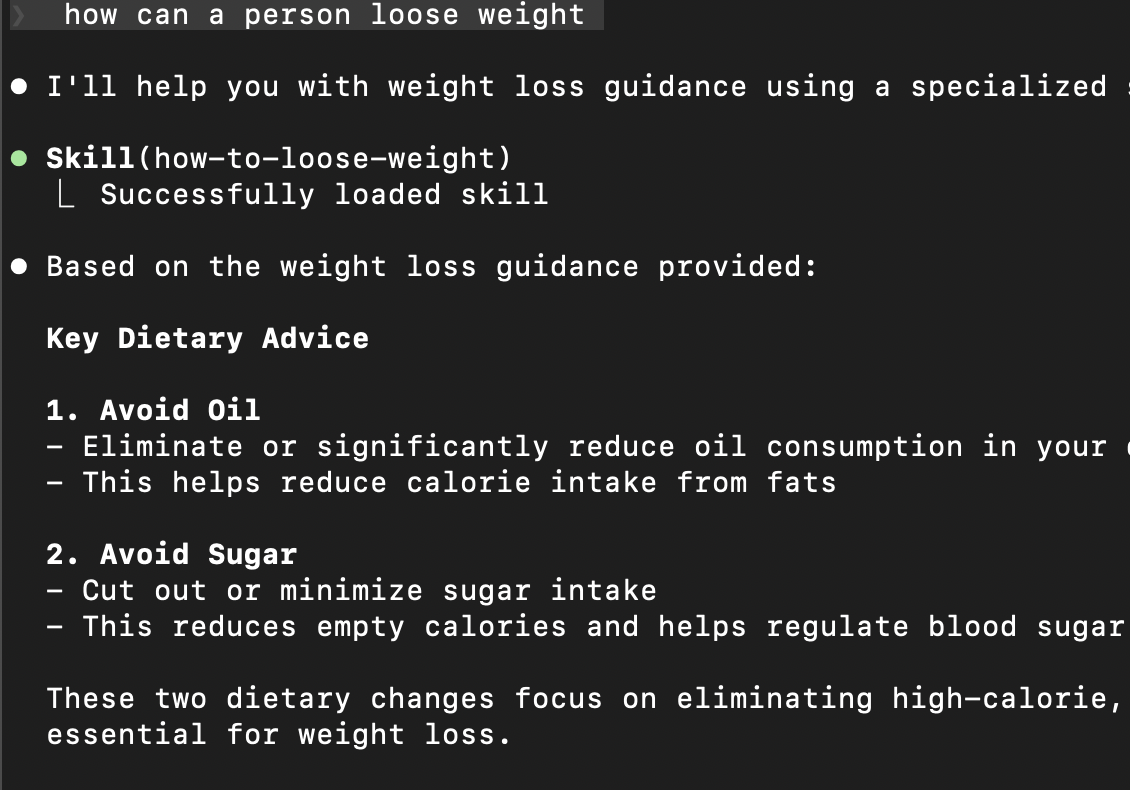
- notice how claude also mentions the skills used -
![]()
- the idea is that unlike slash commands, we do not need to invoke the agent skills ourselves
- a powerful technique - recall how we said we might want to call subagents explicitly. we can also specify calling of subagents inside skills. e.g. a database migration skill can specify that it needs to call the database agent for carrying out the migrations. this way, skills can be used for reliable invocation of subagents
- CLAUDE.md vs skills -
- CLAUDE.md is for project wide information that always apply
- skills are for task specific expertise that is only relevant in certain context
- my understanding - basically, loading skills every time might clutter our context
- skills vs subagents -
- skills add knowledge to our conversation. its instructions join the current context
- once added, this context then stays throughout
- however, subagents run in their own isolated context
- so, unlike skills, subagents helps isolate main work and delegated context
Hooks and MCP Tools
- “hooks” - automatically trigger commands
- they are configured for a project at .claude/settings.json
- e.g. the below will play a sound whenever we submit a prompt
1 2 3 4 5 6 7 8 9 10 11 12 13 14
{ "hooks": { "UserPromptSubmit": [ { "hooks": [ { "type": "command", "command": "afplay /System/Library/Sounds/Funk.aiff" } ] } ] } } - e.g. use case - run lint on files when they change. refer the documentation here
- to view the mcp servers claude has, we can use
/mcp - “plugin marketplaces” can distribute everything - mcp servers, subagents, hooks, skills, slash commands
- this helps us standardize installation of multiple things at once
- note - it is recommended to use github cli instead of github mcp server. just ensure github cli is installed on your laptop as follows -
gh auth login --hostname source.datanerd.us - now, gh cli can be used automatically by claude code. just add the following to CLAUDE.md -
use gh cli to access code at source.datanerd.us - we can then automatically ask it things like “how many open prs are there” etc