Memory Aware Agents
- “agent memory core” - the primary data infrastructure component. it manages the storing and retrieving of an agent’s memory
- it helps achieve the following, which is not otherwise possible using “stateless agents” -
- perform long running tasks
- context awareness from previous turns or interactions
- not only previous turns for the same session, but across sessions as well
- adapt to new information / subsequent interactions
- structured queryable memory, and not just “context stuffing” previous chat logs for better output
- memory management can be categorized into different types -
- “deterministic” - we programmatically read from / write to memory. they can be executed on a fixed schedule, some predefined conditions, etc
- “agent triggered” - provided as tools to agents. agents decide when to invoke it
- “memory unit” - smallest atomic piece of memory. for example, a memory unit for “conversational memory” would have the following fields -
- role - system, user, etc
- timestamp
- content
- “context engineering” / “memory engineering” - this entire process of designing and implementing memory for agents
- these are the different types of memory
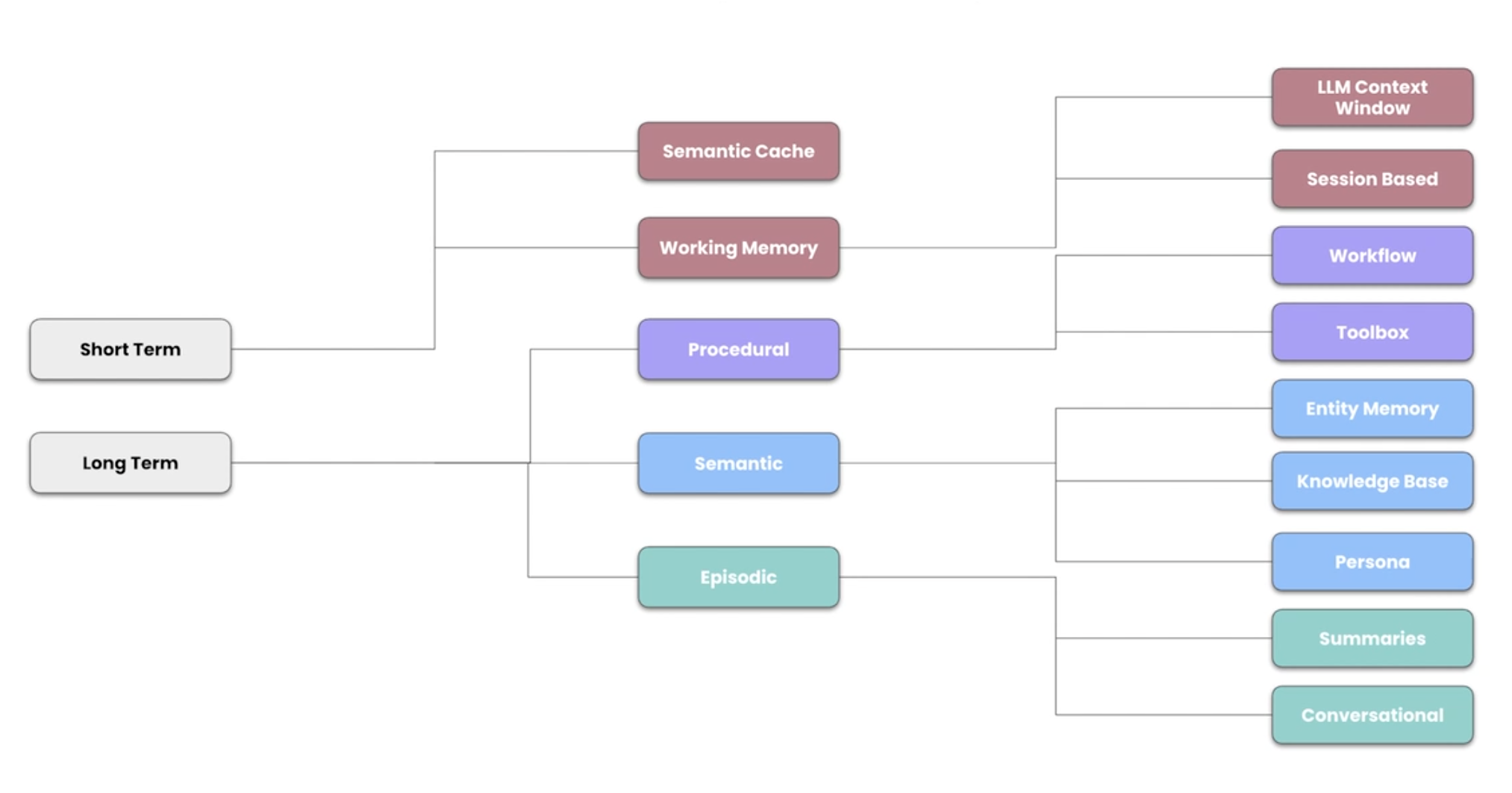
- our data storage logic can for e.g. have different tables to represent each of these types, e.g. one dedicated table for storing “conversational memory” and so on
- additionally, we can create indexes - e.g. index on thread id and timestamp columns
- memories like toolbox, workflow, etc also include a “vector” component. so we have to include the additional logic for generating / storing / searching using embeddings and vectors for them
- we create an index on the vector column in this case too
Tool Memory
- “tool / function calling” -
- a technique where llms do not directly execute the code
- they instead return a structured request for a tool
- our environment / runtime then executes this
- finally, the environment returns the output back to the llm
- we might have a lot of tool definitions, each with its own name, description, parameters, etc
- our context size is limited, and it may not be able to fit all of the tools
- the latency for bandwidth, generating a response, the cost, etc increases as our prompt size etc increase
- putting all tools together leads to “tool selection degradation”, “context bloat”, etc
- so, we can treat these tools as “procedural memory”. we store them, and retrieve them using semantic search as needed
- we make an additional modification to this flow - we take the tool definitions and first augment them by running them through a large language model. this helps ensure we get better results when we perform the semantic search
Memory Management Techniques
- “context window reduction” - two techniques - context summarization and context compaction
- “context summarization” - remove the redundant information not related to the task at hand, remove duplicate information, etc. at the same time, it helps ensure that we do not loose on the key information
- disadvantage - this is a lossy technique as we always loose some information in the process
- “context compaction” - we can store the data in the database. the llm can query this database as and when required
- so, the llm gets an id and potentially a description of the chunk of text, and it can query the database for the actual content if required
- “write back loop” - we can trigger these techniques automatically when the context window for e.g. reaches 80% of the limit. we can approximate that the number of tokens in our context = no. of characters in the context / 4. we can automate the triggering of the context summarization / compaction using the tool memory i.e. basically passing this as a tool to the llm
- assume we are calling the llm for user input from turn 17. however, since the context is already full, we summarize turns 1-16, and then call the llm with the user input of turn 17 and summary for turns 1-16. the next time, the llm would be called with the summary from turns 1-16 and content for turns 17, 18 and 19
Workflow Memory
- assume we want the current weather
- it involves several steps like determining the user’s location, calling the weather api, etc
- “workflow memory” - helps us repeat multi step tasks reliably
- this also gives us the audit, pause and resume from where we left in case of long running tasks, etc
Memory Aware Agent
- “agent loop” - assemble context -> invoke llm -> call tools, ask for user input, etc
- then, we keep repeating this entire process till some final condition is met
- we can set a max number of steps to avoid infinite loops
- “agent harness” - the scaffolding that manages the loop execution, reads and writes to memory, etc
- we can define the different kinds of memory and how to access them in the “system prompt” of the agent. e.g. what conversational memory is,
- now, there are two parts when it comes to the memory -
- outside the loop - based on the user prompt, we populate the content with the documents from semantic stores, from workflow memory, the relevant toolbox definitions, etc
- inside the loop - e.g. when the agent feels that the context is getting too long, it can automatically invoke memory management techniques
Types of Memory
- “semantic memory” - facts, like birthdays for a calendar agent. also called “knowledge base” i think
- “episodic memory” - helps an agent remember how to perform tasks. these are like callbacks to the previous interactions we have had with agents. also called “workflow memory” i think
- “procedural memory” - rules / instructions for an agent to follow. e.g. how to respond to emails
- to support this, a library called “langmem” is available to support persisting and searching on vector databases
- assume we are building an email assistant. firstly, it needs tools to be able to access calendar, email, etc
- then, we also need to augment it using memory -
- what are my meeting preferences
- should i ignore this email
- what is the person’s tone / style of email
- what was the previous reply - this helps determine what to reply next
- there are two different methods to interacting with these memories -
- “hot path” - the agent updates memory as it is responding to the user. pro - memory is updated instantaneously. con - the agent is doing multiple things at once, increases latency as it also has to update the memory while responding to the user, etc
- “background” - a separate process / agent updates the memory. pro - separates the agent from the memory updating, so its simpler and quicker. con - updates might not happen instantaneously
- how we would be adding memory to the email assistant -
- semantic memory using hot path, so the agent can interact with the memory directly
- episodic memory using few shot examples
- procedural memory for setting meeting durations, email writing style, etc via system prompt
- when using memory in langmem, we have this concept of a “namespace”. this helps us separate the memory. for e.g. if we namespace on user memory, the memory of one user does not interfere with another